67Trader Book a walkthrough

Now taking early broker partners.

Your brand.
Your rules.

A trading platform for licensed FX and CFD brokers. Client apps, a manager terminal, and an engine where every cent moves through a ledger.

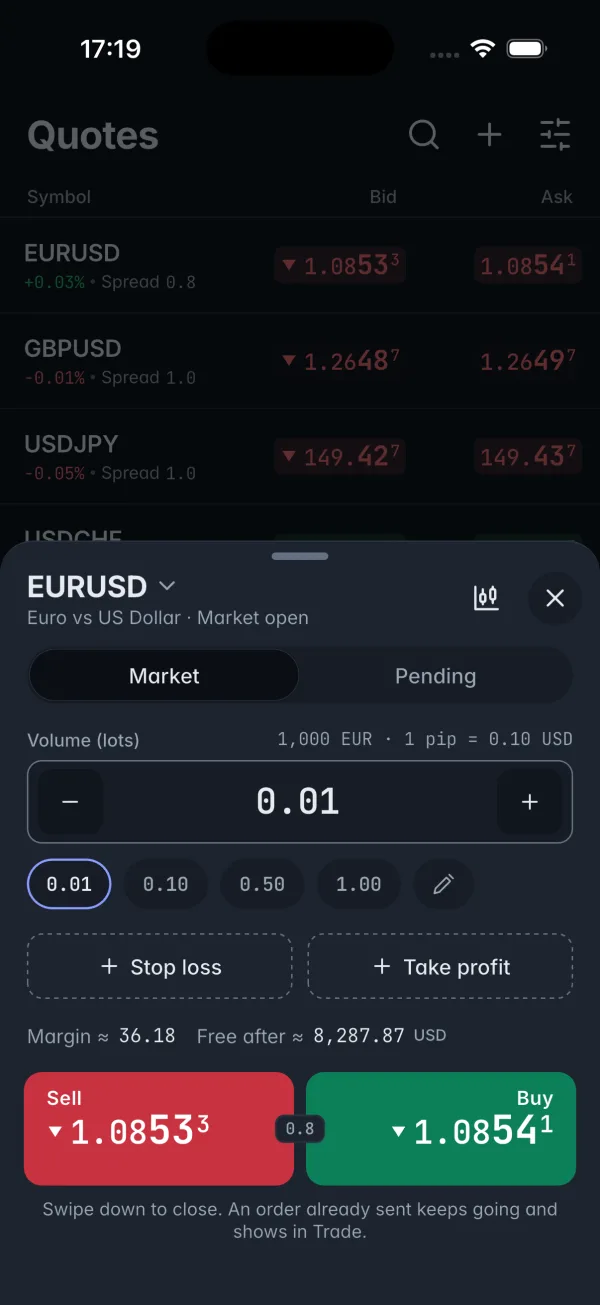
A simplified version of the app's trading screen, redrawn live in your browser in the demo brand. Prices are simulated. The full app is shown in the walkthrough.
One codebase Windows macOS iOS Android
The film

See it in 34 seconds.

A client taps Buy, and your desk sees it. Then limits, the dealing board, margin watch and Broker P/L.

Footage from the real client app and manager terminal, in a demo environment with simulated prices. One scene is a labelled schematic. Sound on.
Tested, not promised

Correctness first. Measured, then claimed.

118

Worked engine examples

368 expected values, each recomputed by an independent 50-digit script. 0 differences.

100,000

Commands per replay test

Live run, replay from zero and replay from a snapshot reach the same state. Required on every engine change.

3,500+

Automated tests

Over 1,000 server and 2,500 app tests, all passing in the last full runs.

5/ 5

Forced-crash tests passed

Engine killed under load: no answered order lost, none filled twice.

Internal tests with simulated prices, last full runs 14 October 2026.

The product

One platform, three sides.

What your clients use, what your office uses, and what makes it yours.

Client apps

Desktop and phone, from one codebase. Quotes on the left, the chart in the middle, positions underneath.

  • Indicators
  • Drawing tools
  • One-click trading
  • Pending orders
  • Stop loss
  • Take profit
  • Trailing stops
  • Price alerts
  • Trade history
  • Dark and light

Manager terminal

For your office, behind a password and an authenticator code.

  • Eight staff roles
  • Read-only auditor
  • Symbols
  • Groups
  • Accounts
  • Audit log

Client security

Two-factor sign-in, a device list with remote sign-out, and login and order rate limits. How sign-in is protected

Regulator pack

Leverage caps by asset class, margin call and stop-out floors, negative balance protection.

Risk controls

  • Close-only symbols
  • Read-only accounts
  • Feed-loss freeze
  • Price-delay policy
  • Max deviation and requote
  • Hedged margin
Use cases

Built for the moments that matter.

Dealing desk

Change leverage with four eyes

A group or symbol change waits until a second staff member approves it. Nobody can approve their own request, and the audit log records both steps.

Risk

A gap runs through a stop

The engine runs margin call and stop-out itself, even with the app closed. A loss past zero is written off when your pack turns that on.

Clients

The signal drops mid-order

The app keeps the order and sends it again. The engine answers a repeat with the first result, never a second fill.

Brand

Your name on every screen

A brand pack sets the name, colours and support contacts your clients see.

Compliance

What happened to this account?

Replay events from the journal, and show who changed what in an audit log with its own checker.

Photos are illustrative. App screenshots elsewhere on this page are real.

Your brand

Make it yours, at no extra cost.

Name, logo, app icon and colours, changed to your request.

  • Name and logo

    On the sign-in and unlock screens and in the desktop title bar.

  • Your colour, your palette

    Your accent on buttons, links, tabs and focus rings, over one of three palettes or your own neutral colours, in dark and light.

  • Checked for readability

    A built-in check measures your brand pack: text must reach 4.5:1 contrast, and an accent too close to buy, sell or warning is flagged.

  • Trading colours stay fixed

    Buy, sell and warning come from the palette, never the brand, so an order always reads the same.

Palette
Theme
Accent

A colour preview drawn with the app's palette values, not a screenshot. Prices are made up.

The engine

Engineering you can audit.

  • Ledger-only money

    No code path sets a balance. A correction is a new entry, never an edit.

  • Exact replay

    The core takes one ordered stream of commands: no clock, no network, no randomness.

  • No floating-point money

    Whole numbers everywhere, counted in 10-8 units of the account currency.

  • Server-side stops

    Every stop, margin call and stop-out is enforced by the engine, not the app.

Security and control

For whoever signs off on it.

The questions your tech lead and compliance team will ask.

  • Staff sign-in

    • A password and an authenticator code, for every staff member.
    • The authenticator is set up at first sign-in.
    • Five wrong tries in 15 minutes lock the login for 15 minutes.
    • Sessions end after 8 hours.
  • Client sign-in

    • Two-factor with an authenticator app, plus ten one-time recovery codes.
    • A device list: sign out one device, or all the others.
    • Failed sign-ins slow down per account, per device and per IP address.
    • Passwords are kept only as Argon2id hashes.
  • Roles and approvals

    • Eight staff roles, and one person can hold several.
    • The auditor role can read, but never change anything.
    • A second staff member approves leverage and margin changes, regulator pack loads and client two-factor resets.
    • Nobody approves their own request, and requests expire after 72 hours.
  • Audit log

    • Every staff change is written to the audit log. If that write fails, the staff member is told.
    • Each entry is chained to the one before it with SHA-256.
    • A checker walks the chain and names the first entry that does not match.
Compare

How 67Trader compares.

Side by side with four established platforms that brokers license today.

Compare with
67Trader compared with four established trading platforms, A to D
67TraderPlatform APlatform BPlatform CPlatform D
Yours to own
Runs in hosting accounts in your name Yes.We set it up on your hosting Not stated.Hosted by the vendor Yes.Option: your own infrastructure or cloud Not stated.Not stated Not stated.Hosting is on their side
Your own branded apps Yes.At no extra cost Yes.Price not stated Yes.Included in the white-label package Yes.Price not stated Not stated.Not stated
Evidence you can check
Correctness test results published Yes.118 examples, 100,000-command replay, crash tests Not stated.Not stated Not stated.Not stated Not stated.Not stated Not stated.Not stated
A second person approves leverage and margin changes Yes.Both steps in the audit log Not stated.Not stated Not stated.Not stated Not stated.Not stated Not stated.Not stated
Audit log of staff actions Yes.With its own checker Not stated.Not stated Not stated.Not stated Not stated.Not stated Not stated.Not stated
Replay the engine journal to the same result Yes.Tested on every engine change Not stated.Not stated Not stated.Not stated Not stated.Not stated Not stated.Not stated
Support
Stated response time for critical incidents Yes.15 min reply, 2 h workaround Not stated.Not stated Not stated.Not stated Not stated.Not stated Not stated.Not stated
24/7 support Yes.Available as an add-on Partly.24 hours, 5 days a week Yes.24/7 via messengers Yes.Technical support 24/7 Yes.24/7 for critical issues
  • Yes
  • Partly
  • Not stated on their website
Book a walkthrough

Platforms A to D are four established platforms licensed to FX and CFD brokers. Their cells come from each vendor's own website, read on 16 October 2026; sources on request. "Not stated" means we did not find it there, not that they lack it. Spot something out of date? Write to ops@67lab.ai and we will correct it.

How we start

From walkthrough to live.

Who does what at each step.

  1. Walkthrough

    You
    Tell us your licence, your regulator and the markets you offer.
    67Lab
    Show the platform on simulated prices.
  2. Your install

    You
    Open the accounts in your name: hosting, app stores and email.
    67Lab
    Set up one install on your hosting, with your brand and regulator packs.
  3. Pilot

    You
    Run the dealing desk for a small group of real clients with capped deposits.
    Both
    Review the reconciliation every day, until four clean weeks in a row.
  4. Live, and maintained

    You
    Own the clients and every regulated relationship.
    67Lab
    Monitoring, fixes and monthly releases under a maintenance agreement. New features are quoted separately.

What you bring

Have these ready and the install can start straight after the walkthrough.

  • Your licence number, your regulator and the markets you offer.
  • Your brand name, logo, colours and the support contacts clients will see.
  • Hosting, app store and email accounts, opened in your name.
  • Your liquidity provider. We connect its price feed for you.
  • The staff who will use the manager terminal, and the role each one needs.
  • A dealing desk for the pilot, and a small group of real clients with capped deposits.
Support

When it matters, fast.

A critical incident is trading halted, prices wrong or stale, money wrong, or sign-in down for many clients.

15min

First reply

to a critical incident

2h

Workaround

for a critical incident

Standard cover: 08:00 to 20:00 Brisbane time (UTC+10) on trading days.

24/7 cover: available as an add-on.

Questions

Straight answers.

Something else? Ask at the walkthrough.

Whose name are the accounts in?

Yours. The hosting, app store, liquidity provider and email accounts are in your name, and 67Lab works through access you grant. 67Lab owns the platform code; your licence to use it is agreed in your contract.

Which regulator's rules does it follow?

Your regulator's limits go into a regulator pack, which we set from your licence at setup: leverage caps by asset class, margin call and stop-out floors, and negative balance protection. The platform enforces the limits in the pack.

How is it priced?

Per broker, after the walkthrough, once we know your licence and setup. Brand changes are included. 24/7 support cover is an add-on.

Where is it hosted?

On hosting in your name. You open the cloud account, and we set up the install there through access you grant.

How long until we are live?

We do not promise a date. After the install, you run a pilot with a small group of real clients, and we both check the reconciliation every day. You can go live after four clean weeks in a row.

Can we see it running first?

Yes. The walkthrough shows the platform on simulated prices. The screen at the top of this page is a simplified redraw.

What do we need to bring?

Your licence details, your brand, accounts in your name and your liquidity provider. The full list is in the checklist, which you can print.

Book a walkthrough

Tell us a little about your brokerage. We will reply by email to arrange a time.

Only for licensed brokers and firms applying for a licence. We do not offer trading accounts.

Email us with your name, your brokerage, and your licence or regulator. The button opens your email app with those headings ready to fill in.

Email to book a walkthrough

Or write to support@67lab.ai from any email account. See the privacy notice for how we handle what you send.